Your Documents. Your AI.
Your Privacy.
The zero-cloud, standalone document and audio analysis workspace. Private local AI tailored for macOS—no servers, no subscriptions to ChatGPT, Claude or Siri AI, 100% offline. Even runs on a MacBook Neo!
Runs on any Apple Silicon Mac (M1/M2/M3/M4/Neo) · Fully optimized for 8GB+ RAM · macOS 15+ · Standalone (No Ollama required)
Designed for Professionals In
The Cloud is leaking.
Your Mac isn't.
Professionals face a dilemma: use powerful AI tools like ChatGPT and risk client confidentiality, or stay offline and work slower.
SecureThink solves this by running a Retrieval-Augmented Generation (RAG) engine entirely on your hardware. No data ever leaves your device.
- 100% Air-Gapped Capable
Works perfectly without an internet connection after activation.
- Local Vector Index
Your documents are indexed and stored securely on your drive.
Uploads files to remote servers. Risk of leaks.
Files stay on your Mac. Local LLM processing.
On-Device Power. Absolute Security.
Everything runs locally on your physical machine. No third parties, no API subscription keys, no compromise.
Audio Transcription & Q&A
Drag & drop audio files (interviews, meetings, recordings) directly into the app. SecureThink transcribes them on-device and lets you query, summarise, and extract insights from the spoken word.
Office Document Generation
Automatically generate PowerPoint slide decks (.pptx), Word documents (.docx), and structured spreadsheets (.xlsx) directly from your chat prompt. SecureThink detects your intent and compiles the files locally.
Local OCR Engine
Analyse non-digital assets. SecureThink's built-in optical character recognition (OCR) reads scanned contracts, hand-written reports, and images, fully locally.
Local RAG & Page Citation
Every answer is backed by a precise citation showing you the exact page number of your imported document, so you can verify facts in seconds.
Interactive Data Charts
Ask SecureThink to analyse metrics or trends and view them instantly in beautiful, interactive bar, line, or pie charts built directly into the chat interface.
Local Website Export
Compile your offline workspace (queries, document references, and interactive charts) into a single, shareable standalone HTML webpage built completely locally.
Built for Privacy-Critical Industries
See how professionals use SecureThink to protect client data while accelerating their workflow.
Legal
AI-Powered Due Diligence
Analyse thousands of contract pages in minutes. Automatically extract key clauses (indemnities, IP, change of control) and flag risks. SecureThink never sees your client's data—your ethical duties stay intact.
Medical
HIPAA/GDPR-Ready Summaries
Summarise patient histories from clinical notes without violating privacy regulations. SecureThink processes everything on-device, so Protected Health Information (PHI) never touches the cloud.
Engineering
Instant Site Compliance Verification
Cross-reference site inspection reports against building regulations (like BS 7671) to instantly flag critical defects. Automatically detect missing "Permit to Work" authorizations.
Education
Protect Research & Student Data
Analyse research papers, grant applications, and assessment documents without sending sensitive data to external servers. Keep unpublished findings, student records, and institutional strategy on your own device.
1. Import Documents
Simply drag & drop your PDFs, Word docs, or Audio files.
2. Local AI Processing
Your Mac reads and understands your data securely on your Mac.
3. Get Instant Answers
Chat with your data. Ask questions, get citations, and generate reports.
Standalone & Optimized.
No Cloud. No Ollama.
SecureThink v2.0 has been re-engineered from the ground up for speed, offline privacy, and zero configuration on macOS.
Zero Dependencies
Unlike the old version, which required you to manually install Ollama, SecureThink is now a fully standalone application.
Built-in Apple MLX Core
Features a native integration of Apple's MLX library. The local models run directly inside the app utilizing Apple's Metal Performance Shaders (MPS) for maximum speed.
8GB RAM Compatibility
Custom memory cache limits prevent system freeze-ups and allow high-performance inference to run smoothly even on baseline 8GB Macs.
Clean Installer
Distributed as a standard signed and notarized .dmg. Just drag it to your Applications folder and it runs immediately—no terminal commands required.
See SecureThink in Action
A beautiful, native macOS interface built for high-performance offline document intelligence.
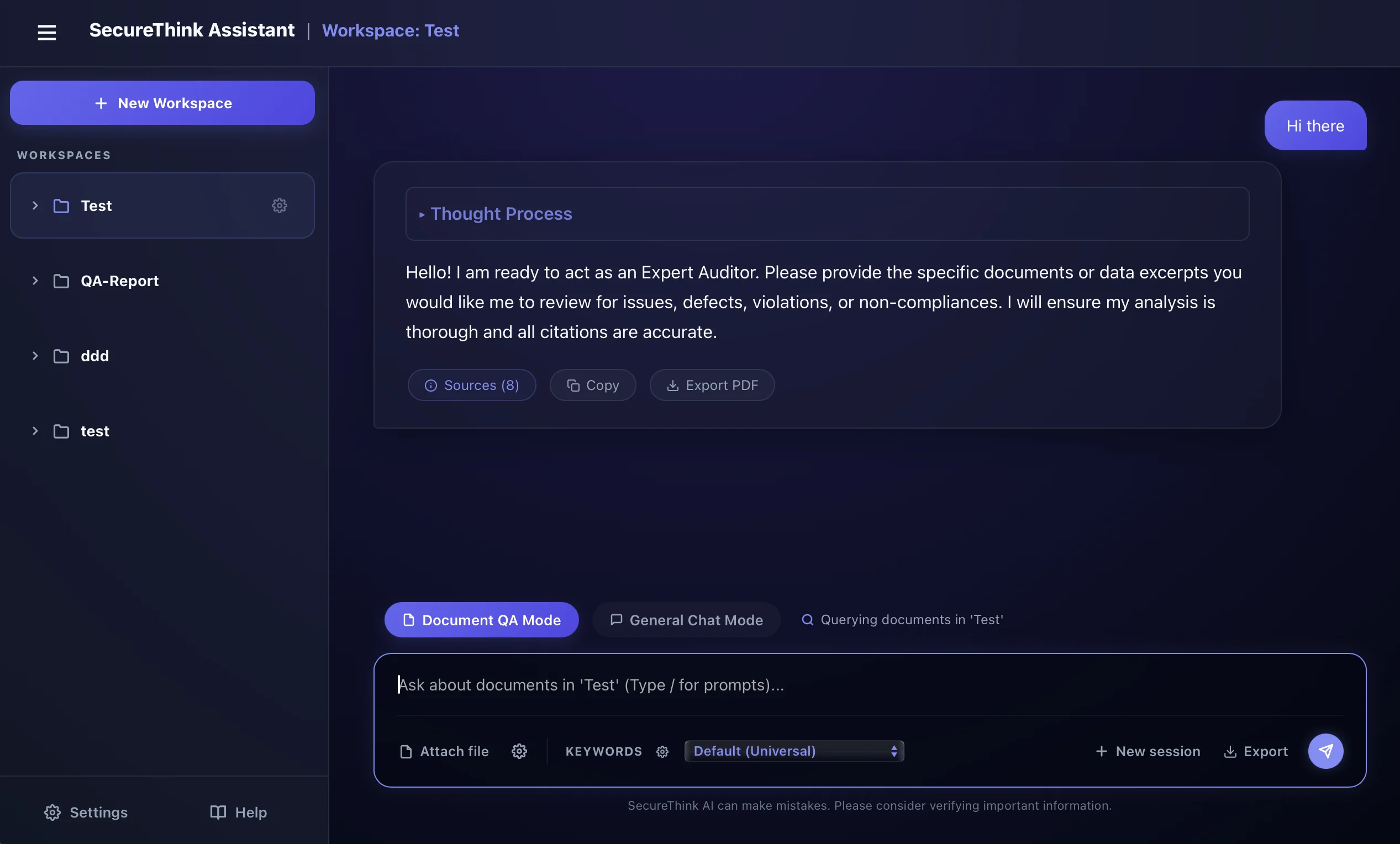
Workspace Setup
Create isolated, air-gapped workspaces for each client, project, or department. Every database, file chunk, and model setting remains completely segmented on your disk.
Simple, Predictable Pricing
Private, on-device AI workspace. Choose the plan that fits your workflow.
Personal
Perfect for individual professionals running standard Macs
- 1 Mac Activation
- Optimized for 16GB+ RAM devices
- Unlimited local vector indexing
- On-device speech-to-text
- Local OCR document parser
- Local document Q&A & charts
- Continuous feature updates
Professional
For commercial use, agencies, and firms
- Flexible Mac Activations (choose quantity at checkout)
- Optimized for 16GB+ RAM devices
- Commercial usage licence
- Multi-user licence key management
- Unlimited local indexing & processing
- Priority Email Support & feature requests